 PlicoPDF
OCR a PDF offline: make scanned documents searchable
PlicoPDF recognizes the text in scanned PDFs entirely on your computer. You get a searchable copy of the PDF, or the text in a .txt file. The document is never sent anywhere.
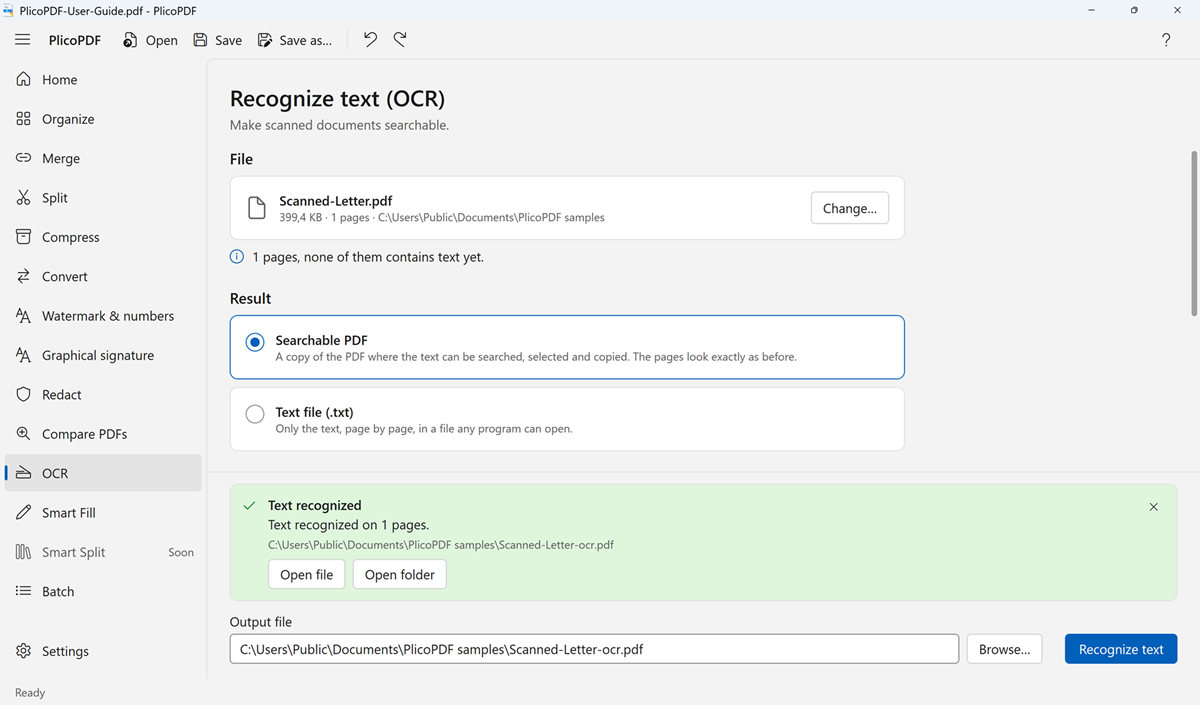
How to OCR a PDF
- Open PlicoPDF and choose OCR.
- Choose the scanned PDF, or drop it onto the window. PlicoPDF checks the pages and tells you how many already contain text.
- Choose the result: Searchable PDF or Text file (.txt).
- Choose the document language: Italian + English, Italian or English. Choose the pages if you don't need all of them.
- Click Recognize text. Progress is shown page by page, and you can stop at any time.
Two kinds of result
- Searchable PDF: a new copy of the PDF with an invisible text layer. The pages look exactly as before, but the text can be searched, selected and copied.
- Text file (.txt): only the text, page by page, in a file any program can open.
The original PDF is never changed.
Good to know
- Languages: Italian and English. More languages are planned.
- Pages that already contain text are skipped, so a PDF that is already searchable is not processed twice. Tick Also recognize pages that already contain text if their text is incomplete or wrong.
- Scan quality matters. If the scan looks poor, PlicoPDF tells you; scanning again at a higher resolution helps. Automatic straightening and cleanup of scans is not available yet.
- Password-protected PDFs: PlicoPDF can't open them yet. Remove the password with another program first.
- Recognition takes a few seconds per page.
OCR is also in the More menu of Organize, and Batch processing can recognize the text of many PDFs at once.
Entirely on your PC
The text recognition engine (Tesseract) and the Italian and English language data are installed with PlicoPDF. Recognition works offline and nothing is uploaded, which matters for IDs, medical records and contracts.
Free beta · Windows 10 and 11, 64-bit · about 107 MB · User guide (PDF, 2 MB)