 PlicoPDF
Compare two PDFs offline: text and visual differences
PlicoPDF compares two versions of a PDF and shows what changed: words and characters, pages, images and the look of each page. Both files stay on your computer.
How to compare two PDFs
- Open PlicoPDF and choose Compare PDFs.
- Choose or drop the Original PDF and the Revised PDF. Swap documents exchanges them.
- Pick the comparison mode: Complete (text and visual), the default, Text or Visual. Set the options if you need them.
- Click Compare PDFs. You can cancel while it runs.
- Go through the differences in the list or on the pages, then export a report if you want to keep it.
What it finds
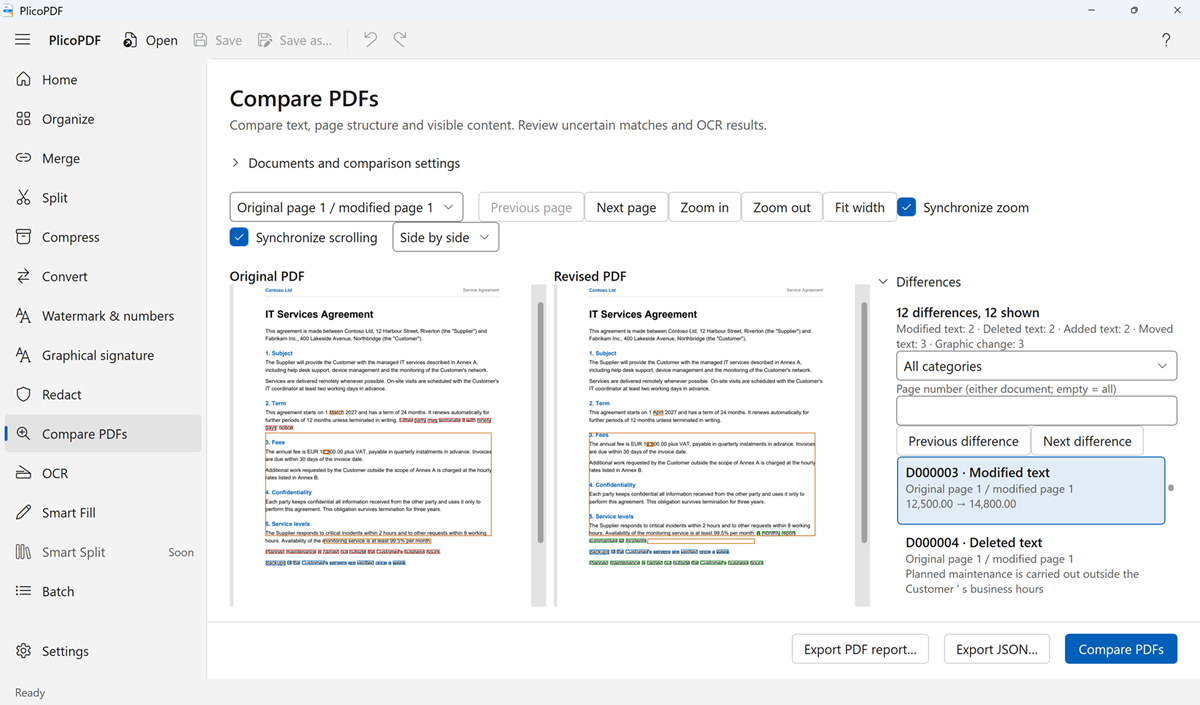
- Text changes word by word, down to the characters that changed: added, deleted, modified and moved text. An amount that went from 1250 to 1750 is shown as such, without highlighting the whole sentence.
- Page changes: added, deleted and moved pages. Pages are matched by their content, not only by their number, so a page inserted in the middle does not make all the following pages look different.
- Images added, deleted, modified, moved or resized, plus graphic changes and changes to formatting or layout.
- Scanned pages: with the optional local OCR (Italian and English) the text of scanned pages is recognised on your PC and compared too.
Options
- Ignore letter case, ignore visible spacing and ignore text formatting and layout, to see only the changes that matter to you.
- Advanced tolerances: colour tolerance (0–100) and edge tolerance in pixels (0–3) for the visual comparison.
Reviewing the differences
- The changes are highlighted on both pages, side by side, or on one document at a time.
- A list of differences with counts, a filter by category and a filter by page number.
- Previous difference and Next difference to move through them in order.
- Zoom, Fit width, and synchronized zoom and scrolling of the two documents.
- Export a PDF report to read or share, or a JSON report for other tools. The report lists the settings, the counts, every difference with its text before and after, and any warnings.
Limits
- Page matching is a heuristic estimate, shown as a percentage. When the match between pages is ambiguous, PlicoPDF says so and does not compare those pages.
- OCR text is approximate: check the highlighted changes on the page.
- The document information (title, author and other metadata) is not compared.
- PlicoPDF finds what changed, but it does not judge the meaning: two sentences that say the same thing in different words are shown as different.
- When part of a document could not be analysed, the result is marked as incomplete and the warnings are listed, also in the report.
Why compare offline
- Private. Contracts and drafts are compared on your PC, not on a server.
- Read only. The two files are only read, never changed.
- Free during the public beta, with no account.
Free beta · Windows 10 and 11, 64-bit · about 107 MB · User guide (PDF, 2 MB)